Friday, 15 July 2016

Pricing Procedure in SAP MM

PRICING PROCEDURE IN PURCHASE ORDER - IN SAP - MM)

1. Create Condition table (T code M/03)

    In condition table, key combination to pick price of condition type will be maintained. when          existing condition tables (in standard SAP) don't fulfill clients business requirement, new condition table to be created.

2. Create Access sequence

    Access sequence is a four character length alpha numeric key. Access sequence to be assigned to condition type for which condition record will be maintained. The access sequence assigned condition types are automatic condition types.

Example: Access sequence will be assigned to PB00 condition type in standard. If we copy new condition type from existing PB00 condition type and if we use the copied condition type in pricing procedure, the access sequence should be assigned to the copied condition type.
PBXX is manual condition type for which no access sequence is maintained.

3. Create Condition type (T code: M/06)

     Pricing element in non-SAP is mapped as condition type in SAP. Each pricing element is mapped as unique condition type. Condition type in SAP is represented with four character length alpha numeric code.
     In condition type screen, we can control it as whether header condition or item condition.
In condition type screen, Accrual check box will be there. If we check the accrual check box, the respective condition type price will be posted in separate G/L account else that price will be loaded on material value.
Example: For freight condition type it will be maintained to show in separate G/L account.

4. Pricing procedure (T code: M/08)

    Pricing procedure is a systematic arrangement of pricing elements (condition types) to calculate the final price of a material.
To determine price the below configuration ha to be done.

          a) Create Schema group purchase organization

Schema group purchase organization is a virtual / interim purchase organization. It is not assigned / used anywhere. It is created and used in pricing procedure only. It acts as a link between local purchase organization and schema group vendor.

          b) Assign Schema group purchase organization to local purchase organization  

              The local purchase organization (which is assigned to plant). will be entered in purchase order.

          c)  Assign schema group vendor to schema group purchase organization. 

               Schema group vendor will be assigned schema group purchase organization.
Finally there is a link among schema group purchase organization, local purchase organization and schema group vendor.

5.  Assign Schema group vendor in vendor master purchasing view

      Schema group vendor will be assigned to schema in vendor master purchasing view. This schema group vendor made a link between schema group vendor and pricing procedure.

6. Maintain Condition Record (T code: MEK1) for access sequence assigned condition type

    Ex: for PB00 condition record will be maintained.
    Access sequence assigned condition types are automatic condition types.
    Price of pricing element (condition type) will be maintained as per unique key combination.
    This key combination plus price is called condition record.


Monday, 1 September 2014

How to track changes of moving average price in SAP (S_P00 _07000139) ?

To track changes of moving average price in SAP (Stock card and inventory report):

             T Code: S_P00 _07000139

Enter input data in the screen (selection criteria) viz.,

date
........ etc
and the execute (F8)


Now you can observe material quantity, price per unit, total quantity with respect to movement type (receipt / issue).

By analyzing these you can understand how the moving average price is being updated in moving average price column.


Thursday, 12 June 2014

Interview Questions in SAP MM

Important Interview Questions in SAP MM?


1. What is the highest organizational level in SAP MM?
2. What is purchase info record?
     How does inforecord will be created automatically?
3. What is source list?
4. How do you block the vendor? Where do you block the vendor?
5. What is Quota arrangement?
6. What is purchasing value key?
7. What is SLED?
8. How do you change material master price?
9. What is moving average price? How do you calculate moving average price?
10. What is material type?
11. Does material type control what functions?
12. What is material group?
13. What is vendor account group?
14. What is vendor evaluation?
15. What is 'scales' in info record?
16. What is reconciliation account?
17. Where do you assign purchase group?
18. What is the role of central purchase organization?
      What is reference purchase organization?
      What is the difference between Central purchase organization functionality and Reference                                                                                                                 purchase organization functionality?
      What is local purchase organization?
19. What are the different master records used in SAP MM?
20. Does vendor account group controls what functions?
21. What is valuation price field in Purchase requisition? what is the use of it?
22. What is the use of Close check box in Purchase requisition?
23. What is document type in Purchase requisition?
24. What are the controlling functions of document type?
25. What is account assignment category?
26. What is item category in MM documents?
27. What are the different types of item categories?
28. What is source determination? what is the importance of 'source determination' check box in purchase requisition?
29. what is the function of 'assign source' field in purchase requisition?
30. What is automatic source determination? What are the prerequisites for automatic source determination?
31. What are important partner functions of Vendor?
32. What is pricing procedure?
33. What are the important steps to configure pricing procedure?
34. What is condition table?
35. What is access sequence?
36. What is condition type?
37. What is Automatic condition type?
38. What is manual condition type?
39. What is condition record?
40. What is schema group purchase organization?
41. What is schema group vendor?
42. How pricing procedure picked in purchase order?
43. What is supplementary pricing procedure?
44. What is standard pricing procedure in SAP MM?
45. What is standard import pricing procedure?
46. What is standard STO pricing procedure?
47. How do you differentiate automatic condition type and manual condition type?
48. What is the functionality of Accrual key in condition type?
49. How do you map customs vendor in import process?
50. What is condition technique?

Friday, 24 January 2014

Organizational Structure in SAP

Organizational Structure in SAP

            Organizational structure is an hierarchy of organizational units. Each organizational unit is an element of organizational structure.Organizational structure represents departments, workflow, flow of authority and responsibility etc..
Organizational Structure in SAP

Client:

          Commercially, technically, Client is also an organizational unit. Client is an highest level organizational unit in the organizational structure. Set of tables, master records are maintained at client level.
          Client is represented with three digit number. Master client (000, 001), Early watch client (066), IDES or Training client (800) are clients in standard SAP. BASIS people creates new clients.

Company code:

         Company code is a separate legal entity or separate accounting department. Accounting people work at company code level. Balance sheet, Profit & Loss statement and all financial statements maintained at company code level. Company code is represented by four digit code. It may be numeric or alphabetic or alpha numeric.

Purchase Organization:

        Purchase organization is responsible to procure materials or services from external vendor or internally from plant. Purchase organization is represented by four digit code. It may be numeric or alphabetic or alpha numeric. According to function and responsibilities purchase organizations are six types. Viz.,
1. Plant specific or Local plant purchase organization
2. Cross plant purchase organization
3. Cross company code purchase organization
4. Central purchase organization
5. Standard purchase organization
6. Reference purchase organization.

Plant:

       Plant is an organizational unit where production takes place. Plant is represented by four digit code. It may be numeric or alphabetic or alpha numeric.

Storage location:

       Storage location is an organizational unit where materials (viz.,raw materials, finished goods, semi finished goods etc) are stored.Storage location is represented by four digit code. It may be numeric or alphabetic or alpha numeric.


Organizational Structure in SAP


Thursday, 23 January 2014

Automatic Account Determination in SAP

Click Here!

Automatic Account Determination in SAP

      Automatic account determination is a process to pick suitable G/L account when goods movement has been taken place. By configuring automatic account determination settings, system will determine G/L account for posting according to goods movement type automatically.

Automatic Account Determination in SAP

Factors which influence account determination are the following:

1. Chart of accounts
2. Valuation area ( Plant or Company code)
3. Valuation class
4. Valuation modifier or Transaction key
5. General Modifier or Account modifier

Important Transaction Keys:

BSX - Stock G/L account or Inventory G/L account
WRX - GR / IR clearing account
GBB - Offsetting entry for inventory posting
KBS - Account assigned purchase order
BSV - Change in stock account
FRL - External activity
FRN - Incidental costs of external activity
KON - Consignment payable s
UMB - Gain or Loss from Revaluation
AUM - Expense or Revenue from stock transfer
AKO - Expense or Revenue from consignment material consumption
KDM - Material management exchange rate difference
PRD - Price difference account
VST - Input tax

Important account modifiers:

( Only GBB, PRD and KON transaction keys have account modifiers)

for GBB

ZOB - GR without Purchase order
ZOF - GR without production order
AUF - GR for production order with account assignment
BSA - Initial entry of stock balance
INV - Expense or Revenue from inventory differences
VBO - For consumption from stock of material provided to vendor
VBR - For internal Goods issue
VKR - For consumption for sales order without SD
VAX - GI for sales order without account assignment
VAY - GI for sales order with account assignment
VNG - For scrapping or destruction
VQP - for sampling

for PRD

"     " - (none) for GR & IR for purchase order
PRF - GR for production order
PRA - GI and other goods movements

for KON

"    " - (none) for consignment liabilities
PIP - for pipeline liabilities


Third Party Procurement in SAP MM

Third party procurement process in SAP MM

          Third party procurement process is one of the special procurement processes. In third party procurement process, customer orders goods to a company 'X'. Company 'X' gives sales order to customer for the ordered goods. Now, company 'X' gives purchase order to vendor with customer delivery address. Vendor directly delivers goods to customer. Company 'X' pays to vendor. And company 'X' collects payment from customer.  
Third Party Procurement process in SAP MM

Steps for Third party procurement process in SAP MM

1. Create material master in MM01 t-code.

        Enter required details and in sales organization 2 view, maintain item category 'BANS'

2. Create sales order in VA01 t-code.

        Enter required details and make sure that item category as 'TAS'.
      (Because of this item category 'TAS', system creates purchase requisition in background.)

3. Go to display of sales order in 'VA03' t-code.

        Enter sales order number and click enter. Sales order will be displayed. Double click on item row and           then click on procurement button under schedule line tab and observe purchase requisition number. 
             (OR)
    Go to ME53N t-code and in search help(F4), find the purchase requisition number in the sales document       tab and observe item category as third party & account assignment category as third party.
                In delivery tab customer master record is picked but not our plant address.

4. Create purchase order in ME21N t-code.

        In item row enter purchase requisition number and enter. Observe & make sure that item category and account assignment category as third party and delivery address as customer address.

5. Enter logical Goods Receipt in MIGO t-code.

        Enter purchase order number and enter. Movement type picked as 101. In partner tab, it shows that goods are delivered from vendor to customer. No storage location. Check and post.
        Observe accounting document. Transaction keys are +KBS, -WRX.

6. Enter invoice verification in MIRO t-code.

       Enter purchase order number and enter. Enter required details and post. Observe the accounting document. Transaction keys are -KBS, +WRX

7. Create billing or customer invoice in VF01 t-code (in SD side).


Thursday, 9 January 2014

important Transaction Codes in SAP MM

SAP MM Transaction codes (t-codes)

Important Transaction codes SAP MM
SAP MM T-codes

Material Master

OMS2 - Material type customization
MMNR - Material master number range
MM01 - Material master creation
MM02 - Material master change
MM03 - Material master display
MM04 - Display changes of material master
MM06 - Flag for deletion of material master
MM11 - Material master creation - schedule
MM12 - Change schedule of Material master
MM13 - Activate schedule of Material master
MMAM - Material type change
MR21 - Material price change
MMSC - Create/ extend existing material to several stores at a time
MM60 - To see Material list
MMBE - To see Stock overview

Vendor Master

OMSG - Define Vendor account group
OMSJ - Define number ranges for vendor master
MK01 - Create vendor master ( FK01 / XK01)
MK02 - Change vendor master ( FK02 / XK02)
MK03 - Display vendor master( FK03 / XK03)
MK04 - Display changes of vendor master( FK04 / XK04)
MK05 - Block vendor master( FK05 / XK05)
MK06 - Flag for deletion of vendor master( FK06 / XK06)

Info Record

ME11 - Create info record
ME12 - Change info record
ME13 - Display info record
ME15 - Flag for deletion of info record

Source List

ME01 - Create/ maintain source list
ME03 - Display source list
ME04 - Display changes to source list
ME05 - Generate source list

Friday, 3 January 2014

Physical Inventory in SAP MM

Physical Inventory in SAP MM:

              Verification of physical existing stock and comparing with book balance (system stock) and adjusting system stock to physical stock is called as physical inventory in SAP MM.
Physical Inventory in SAP MM

               The main purpose of physical inventory is to prepare warehouse balance sheet for F.I auditing purpose.

Types of Physical inventories:

1. Manual physical inventory (continuous, periodic, manual)
2. Cycle counting
3. Inventory sampling

1.Manual Physical Inventory:

Step-1: Create physical inventory document (PID)
       Path: Logistics--------> MM-------> Physical inventory-------> PID------> Create
       T.Code: MI01
                   Enter Required details.
Note: For each storage location separate physical inventory document is require. For special stock and warehouse stock also separate physical inventory document is required.
           If we select Check box of Posting Block, all the goods movements are blocked until completion of counting process.
           If we select check box of 'freeze book inventory' , we can still allow the goods movement, but at the time of preparing this document what ever stock is there, that stock will be freezed and counted physical stock will be compared with freezed system stock.
           Enter physical inventory required material numbers and other details and save the document.
Note down physical inventory document number.

Step-2: Print physical inventory document (T.code: MI21)
            Enter physical inventory document number and click execute. Enter print output device and take printout.

Step-3: Enter counted physical stock (T.code:MI04)
           Enter physical inventory document number and click. Enter physically counted value and save.

Step-4: Post differences (T.code: MI07)
           Enter physical inventory document number and click. Enter reason for movement and save.Here physical inventory document is created and material document is posted.
           In MMBE, system stock is adjusted as physical stock.
Note: Goto material document display in MIGO or in MB03. Observe triggered movement types and accounting documents. Here stock GL account is debited or credited and Loss or gain GL account is debited or credited based on excess or shortage of physical stock with respect to system stock. Transaction keys triggered are BSX, GBB-INV.

Thursday, 2 January 2014

Consignment Procurement in SAP MM

Consignment Procurement in SAP MM:

                    In consignment procurement process, vendor keeps his stock of material in plant premises and there is no invoice from vendor and no payment to vendor. When we need material we can withdraw from vendor consignment stock and for that withdrawal quantity only we have to settle the liabilities to vendor.

                    For this, first we have to activate consignment prices via info record. (Path: SPRO--> MM --> General settings for MM--> Activate consignment prices via info record.)

Steps for Consignment procurement in SAP:

Step-1: Create info record in ME11


      Enter Vendor, Material, Standard Purchase Organization, Plant and info category as Consignment. Here Tax code is must.Enter prices, validity periods in condition screen.

Step-2: Create Purchase Requisition (PR) in 'ME51N''

       Enter item category as 'K', material number, Quantity, Plant, Storage location. Here Account assignment category entry is not possible with item category 'K' combination.

Step-3: Create Purchase Order (PO) in 'ME21N'

       Enter vendor number, standard purchase organization. In item row enter PR number, then click enter.
Note: Here Net Price is graded out.Condition tab is disappeared because price will be picked from info record at the time of settlement but not from PO.
         Here invoice tab is also disappeared. So the tax code will be picked from info record.
If we observe consignment item category details, GR non-valuated is firmed and IR indicator is also firmed.It means these are selected from back ground but hided in PO.

Step-4: Enter Goods Receipt (GR) in 'MIGO'

        In MIGO, in Goods Receipt enter PO number and movement type '101'. In where tab movement type is 101-K and stock is shown as belongs to vendor.Item OK.Check and Post. 
Note: Here ' No subsequent document found in accounting'.
         In 'MMBE' our stock is not increased but vendor consignment stock is increased.This stock is not belongs to our company. It still belongs to Vendor.That's why no accounting document is created at GR.( In IMG, item category consignment GR non valuated is selected)

Step-5: Enter Goods Issue to cost center in 'MIGO'

      In MIGO, in Goods Issue, select other. Enter movement type '201-K'. Enter material, quantity, Plant, storage location.click enter. In account assignment tab, enter cost center. Item OK. Check and Post.
Note: In MMBE, vendor consignment stock decreased.
         Here accounting document is created. (transaction keys: -KON, +GBB with VBR)
         Account payable credited(-) with info record price and consumption G/L account is debited (+) with material master standard price.and differed price will be posted to price difference account.

Step-6: Settle consignment Liabilities to GI quantity in ' MRKO'

          In 'MRKO', enter company code, vendor, plant, material, consignment. Select settle. Select check boxes of withdrawals not settled and settled withdrawals. And then Execute. Click on created settlement document number. Observe amount details.

Step-7: Transfer posting form Vendor consignment stock to our own stock.

         After completion of consignment agreement, if still some quantity is left over in vendor consignment stock, then that stock to be converted into our own stock.
         In MIGO, in Transfer posting, select other and Movement type '411-K'. Click enter.
In Transfer posting tab, enter material, plant, storage location, special stock indicator as 'K' and vendor.
In quantity tab, enter quantity,. Item OK. Check and Post.

Step-8:  Settle consignment Liabilities for this owned stock in 'MRKO'


Wednesday, 1 January 2014

Important Goods Movement Types in SAP MM

Movement Types in SAP MM
                Movement type is core of inventory management in SAP. Movement type is represented by three digit numeric key (in standard SAP). If we want, we can create movement types in alpha numeric combination. Movement type indicates the type of material movement. example: Goods receipt to store, Goods issue to cost center, Goods issue against production order etc..

                Any movement type is characterized by stock update , value update or both. The movement type enables the system to find predefined posting rules, determines how the accounts of financial accounting system (stock G/L account and consumption G/L account) are to be posted and how the stock fields in the material master record are to be updated.
               When we enter a goods movement, we must always enter respective movement type. The movement type has important control functions
Movement Type controls.........
1. Updates stock and consumption G/L accounts
2. Field selection
3. Updates quantity fields
4. Putting Goods Receipts or Goods Issue slips

Important Goods Movement Types in SAP MM

101 : Goods Receipt (GR) for purchase order or order
102 : Reversal to 101 movement type
103 : Goods Receipt for purchase order into GR blocked stock (accounting document not created)
104 : Reversal to 103 movement type
105 : Release of GR blocked stock into GR stock (accounting document created here)
106 : Reversal to 106 movement type
107 : Goods Receipt for purchase order into GR blocked stock (accounting document created)
108 : Reversal to 107 movement type
109 : Release of GR blocked stock into GR stock (accounting document not created here)
121 : Subsequent adjustment for sub-contracting (this movement type can't be entered manually)
122 : Return delivery to supplier or production department
123 : Reversal to 122 movement type
124 : Return delivery to vendor from GR blocked stock ( similar to 104)
125 : Reversal to 124 movement type (similar to 103)
161 : Return for purchase order

201 : Goods Issue for cost center
231 : Goods Issue for Customer order (without shipping)
241 : Goods Issue for an Asset
251 : Goods Issue for sales (without customer order)
261 : Goods Issue for an Order
281 : Goods Issue for a network
291 : Goods Issue for an Arbitrary account assignment

301 : Transfer posting from plant to plant in one step
303 : Transfer posting from plant to plant in two step - Removal from storage
305 : Transfer posting from plant to plant in two step - placement in storage
309 : Transfer posting material to material
311 : Transfer posting from store to store in one step
313 : Transfer posting from store to store in two step - Removal from storage
315 : Transfer posting from store to store in two step - Placement in storage
321 : Transfer posting stock in quality inspection to un-restricted use stock
323 : Transfer posting storage location to storage location  - stock in quality inspection
325 : Transfer posting storage location to storage location  - blocked stock
331 : withdrawal of sample from stock in quality inspection
333 : withdrawal of sample from un-restricted use stock 
335 : withdrawal of sample from blocked stock
340 : Revaluation of batch
341 : Change in status of a batch ( available to unavailable )
343 : Transfer posting Blocked stock to un-restricted use stock
349 : Transfer posting from blocked stock to stock in quality inspection
351 : Goods Issue for stock transport order (without sampling)

411 : Transfer posting of special stocks E,K and Q to company's own stock
413 : Transfer posting to sales order stock
415 : Transfer posting to project stock
451 : returns from customer (without shipping)
501 : Goods receipt without purchase order -Unrestricted use stock
503 : Goods receipt without purchase order- stock in quality inspection
505 : Goods receipt without purchase order -blocked stock
511 : free of charge delivery from vendor
521 : Goods receipt without order -Unrestricted use stock
523 : Goods receipt without order- stock in quality inspection
525 : Goods receipt without order -blocked stock
531 : Goods Receipt for by-product from vendor
541 : Transfer posting unrestricted use stock - stock of material provided to vendor
543 : consumption from stock of material provided to vendor
545 : Goods receipt for by-product from sub-contracting
551 : scraping from unrestricted use stock
553 : scrapping from stock in quality inspection
555 : scrapping from blocked stock
561 : initial entry of stock - unrestricted use stock
563 : initial entry of stock - quality inspection stock
565 : initial entry of stock - blocked stock

601 : Goods Issue for delivery (shipping)
641 : Goods Issue for Stock transport order (shipping)
643 : Goods Issue for inter company Stock transport order (shipping)
645 : Goods Issue for inter company Stock transport order in one step (shipping)
647 : Goods Issue for Stock transport order in one step (shipping)
651 : Returns from customer (shipping)
671 : Returns to stock transport order via. shipping


Tuesday, 31 December 2013

Purchase info record in SAP MM

Purchase info record:
              Purchase info record contains information on a material and vendor of that material. Purchase info record is a source of information with material and vendor combination. The main purpose of purchase info record in SAP is to copy data from info record to all purchasing documents (RFQ, PO, Outline agreements).
Purchase info record in SAP MM
Purchase info record in SAP

              Purchase info records can be created manually or purchase info records can be updated automatically in the back ground while entering quotation or purchase order or outline agreement by selecting info update option.
              Purchase info records can be created with or without material master and with or without plant.

Types of purchase info records:
1. Standard
2. Pipeline
3. Consignment
4. Sub-contract

Purchase info record contains.........
1. Material Number
2. Vendor Number
3. Plant (if plant specific info)
4. Remainders, Order unit (picked from material master purchasing view)
5. Vendor sales person, contact details etc. (picked from vendor master purchasing view)
6. Return agreement for returns ( in case returns are there)
7. Regular vendor or not
8. Purchasing group ( picked from material master otherwise from vendor master)
9. Planned delivery time (picked from vendor master)
10. Under delivery and over delivery tolerances ( picked from vendor master)
11. Net price
12. Tax code
13. Incoterms (picked from vendor master)
14. Conditions for price, scales,
15. Validity periods etc.

Vendor Master Record in SAP MM

Vendor Master Record:        

Vendor Master Data
Vendor Master Data
         
                              Vendor master record contains information of vendors (suppliers). Vendor master record contains vendor's name, contact details, address, ordered currency, terms of payment, accounting information, reconciliation account and Excise details.
                       Vendor Master Record is maintained by both purchasing department and accounting department in SAP.
Vendor Master Data Maintenance

Structure of vendor master data:
                      Vendor master data maintains three specific areas data. Viz.,
1. General data:
       Data which is maintained at client level and is applicable to all company codes is maintained in general data..
2. Company code data:
       Data which is specific to company code is maintained at this level.
3. Purchasing data
       Data which is specific to purchase organization, Partner roles for certain plants or vendor sub-range is maintained at this level.

Vendor Account Group:
       Vendor account group in SAP is defined as classification of suppliers based on partner roles and assigning to one account group. i.e., Classification of suppliers as vendors, goods suppliers, forwarding agents, ordering addresses, one time vendors etc. and assigning to one account group. Example: Vendors-0001 etc.
        Vendor account group controls.......
1. Number assignment
        i.e. external number assignmet or internal number assignment.
2. Field selection
       i.e. which field is mandatory, which field is optional, which field is hidden, which field is displayed.
3. Partner functions
       i.e. vendors, ordering addressee, forwarding agent, goods supplier etc..

Monday, 30 December 2013

Material Type in SAP

Material Type:
            Materials which are having same attributes are grouped together and assigned to one material type.
(OR) Classification of materials into different material types based on material attributes.

            Material type is a controlling function in SAP. Material type controls.......
1. Number assignment
        i.e. external number assignment or internal number assignment
2. Field selection
        i.e. which fields to be hidden, which fields to be displayed, which fields are mandatory, which fields are optional
3. Procurement
       i.e. external procurement or in-house production
4.Valuation class
       i.e. which valuation classes to be allowed and which valuation classes not to be allowed
5. Department views
       i.e. which department views to be appeared in user department selection view
6. Inventory update 
       i.e. inventory update is required on quantity basis or value basis or both

Important Material Types:
ROH  - Raw materials
HALB- Semi finished goods
FERT - Finished goods
HAWA - Trading goods
ERSA - Spare parts
LEIH - Returnable transport packaging (RTP)
PIPE - Pipe line materials
NLAG - Non-stock materials
UNBW - Non-valuated materials
FRIP - Perishable materials
KMAT - Configurable materials

Material Master record in SAP MM

Material Master Record:
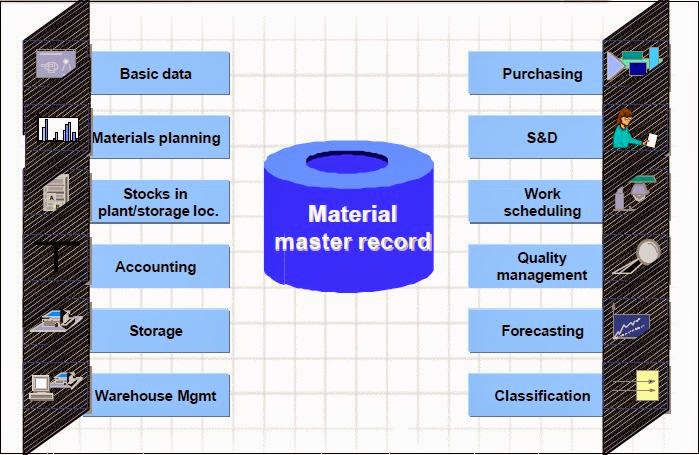
             Material master record is a central depository of information of the material in SAP. Material master record contains the information of the material that which a company procures, processes, stores, sells. The required information in the material master record is maintained by users of respective departments. All the users of different departments can access the required information from material master record. so that material master record is called as central depository of material information.

Important Views in Material Master record in SAP:
1. Basic data 1
2. Basic data 2
3. Purchasing
4. MRP1
5. MRP2
6. MRP3
7. MRP4
8. Plant/ Storage data 1 view
9. sales view 1
10. sales view 2
11. Accounting 1 view
12. Import data view
13. Export data view
14. Warehouse view


What are Master Records in SAP MM?

Master Record:
                       Master records are central depository of information in SAP. Every master record is provided by certain information from respective department point of view. The information from master records can be accessed by all the users from different departments.

Important Master Records in SAP MM:
1. Material Master record
2. Vendor master record
3. Condition record
4. Service master record
5. Purchase info record
6. Source list record
7.Quota arrangement record
8. Batch Master record

Business processes in SAP

Business Processes in SAP:
1. Standard Procurement
2. Stock Transfers (STO)
      a) Inter Company STOs
      b) Intra Company STOs
3. Sub Contracting procurement
4. Consignment Procurement
5. Pipeline Procurement
6. Third Party Procurement
7. Outline agreements
      a) Contracts
      b) Schedule agreements

What is SAP?

                 SAP stands for Systems Applications and Products in data processing. SAP is one of the ERP software for business solutions. SAP is a product (application) from SAP AG, Germany. SAP is a leading ERP software among all the ERP softwares in the market. The competitive edge of SAP software is tight integration  of all the modules
SAP ERP software
SAP
.             SAP  was started by five former IBM employees in 1972, in Mannheim,  Germany. SAP is world's largest Enterprise Business Software company. In German, the SAP stands for Systeme, Anwendungen, Produkte. In English, it is Systems, Applications and Products.  

What is ERP?

What is ERP?
                                ERP stands for Enterprise Resource Planning. ERP is defined as integration of different business processes of different functions of an Organization to deliver the best product or service to the customer at right time, at right price by maximizing Organization's profit.
                               ERP software automates business processes. Automation of business process reduces time, reduces errors, increases efficiency by that right decisions can be taken at right time.
ERP software
ERP System

                                ERP consists of different modules. It integrates all the modules. Modules can be purchased & implemented individually according business need. Industry specific ERP software     also available in the market. 
ERP Software Integration
ERP System


Different ERP softwares:
            Tier 1 for large Businesses:
                                SAP, Oracle, Microsoft etc.
            Tier 2 for large Businesses:
                                Epicor, Sage, Lawson, QAD, Infor, etc.
             Tier 3 for large Businesses:
                                Netsuite, Syspro, CDC software, Consona, Exact Globe, etc